Introduction
Amazon FBA (Fulfillment by Amazon) has become one of the most popular ways to build an e-commerce business—especially for beginners. The concept is simple: you send your products to Amazon’s warehouses, and Amazon handles storage, packaging, shipping, customer service, and returns. You focus on finding and listing products; Amazon handles everything else.
For beginners, this is a game-changer. You don’t need to rent warehouse space, hire packers, or set up complex shipping operations. You can start a legitimate online business from your home computer with far less infrastructure than starting a traditional retail business.
The numbers are compelling. According to recent data, over 60% of total units sold on Amazon come from third-party sellers using FBA. That’s billions of dollars in product movements annually—and a massive opportunity for entrepreneurs willing to learn the system.
However, Amazon FBA isn’t a get-rich-quick scheme. Successful sellers invest time in product research, understand their costs, optimize their listings for visibility, and manage their businesses strategically. It takes upfront investment (typically $1,000-$3,000 for a simple launch), patience during the ramp-up period, and ongoing attention to detail.
This comprehensive guide will walk you through everything a beginner needs to know about selling on Amazon FBA. You’ll learn how FBA works, how to research profitable products, where to source products, how to optimize listings for the Amazon algorithm, how to understand all fees involved, and strategies to build a profitable business over time.
https://trendminers.online/legitimate-side-hustles/
Whether you’re looking for a side income or aiming to build a full-time e-commerce brand, this guide provides the roadmap.
For complementary strategies on building income streams, check out: 25 Legitimate Side Hustles That Pay $500+ Per Month
Understanding Amazon FBA: How It Works
Before diving into the “how,” let’s clearly understand what Amazon FBA is and how it differs from other selling methods.
What Is Amazon FBA?
Amazon FBA (Fulfillment by Amazon) is a service where sellers send their inventory to Amazon’s fulfillment centers, and Amazon takes care of the storage, packing, shipping, customer service, and returns for those products.
The basic flow:
- You source products (from manufacturers, wholesalers, or suppliers)
- You ship products to Amazon’s fulfillment centers in bulk
- Amazon receives, scans, and stores your inventory
- When a customer purchases your product, Amazon picks, packs, and ships it
- Amazon handles customer service and returns for those orders
FBA vs. FBM (Fulfillment by Merchant)
You can also sell on Amazon by shipping products yourself (FBM—Fulfillment by Merchant). Here’s how they compare:
FBA (Fulfillment by Amazon)
| Advantage | Disadvantage |
|---|---|
| Prime eligibility (huge for conversion rates) | Monthly storage fees and per-item fees |
| Customers trust Amazon’s fulfillment | Ongoing inventory costs |
| No shipping work for you | Less control over the unboxing experience |
| Handles customer service and returns | Inventory limits can restrict access |
| Better search ranking for FBA products | Long-term storage fees for slow-moving items |
FBM (Fulfillment by Merchant)
| Advantage | Disadvantage |
|---|---|
| No storage fees from Amazon | Must ship everything yourself |
| Full control over packaging and customer experience | No automatic Prime eligibility |
| Better for very large or unusual items | More customer service work |
| No long-term storage penalties | Lower search ranking typically |
For most beginners, FBA is the clear winner. The Prime badge alone dramatically increases conversion rates, and the trust factor is enormous. Customers are much more likely to buy a Prime-eligible product from the world’s largest retailer than a random third-party seller shipping from their home.
Amazon FBA Fees to Understand
You pay Amazon fees for their services. Understanding these fees is critical for profitability.
Referral Fees
Amazon charges a referral fee on every sale, typically 8-15% of the product price (depending on category). For example, if you sell a $30 product in the “Home and Kitchen” category (15% referral fee), Amazon takes $4.50.
FBA Fulfillment Fees
These cover picking, packing, and shipping. In 2024, for a standard-sized small product, the fulfillment fee is approximately $4.20-$4.50. Larger products cost more.
Storage Fees
Amazon charges monthly storage fees based on the volume your products occupy in their warehouse. Standard-size storage in January-September is approximately $0.87 per cubic foot. October-December (holiday season) is significantly higher at $2.40+ per cubic foot.
Additional fees may include:
- Long-term storage fees (for inventory sitting over 180 days or 365 days)
- Removal fees (if you want to take unsold inventory back)
- Disposal fees
- Prep fees (if Amazon preps your products for you)
Key takeaway: Calculate all costs before sourcing a product. A product that looks profitable at first glance may lose money once all fees are factored in.
Step 1: Product Research—Finding Winning Products
Product research is the most critical step in Amazon FBA success. Choose the wrong product, and no amount of marketing will save it. Choose the right one, and you can build a profitable, growing business.
What Makes a “Good” Amazon FBA Product?
The GOLDEN criteria:
G – Good demand: Products that people are actively buying
O – On Amazon, but not dominated: Room for a new seller to compete
L – Low risk: Not dangerous, not complex, not easily broken
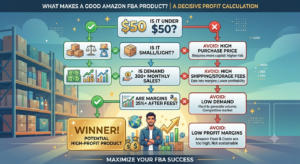
D – Decent profit margins: After fees, you’re making 25-30%+ profit
E – Easy to ship: Small, lightweight, not fragile
N – No seasonal restrictions: Can sell year-round
Specific characteristics of winning beginner products:
- Price point: $20-$50 (enough margin for fees and profit, affordable for impulse buying)
- Size: Small enough to fit in a small box (keeps fulfillment fees low)
- Weight: Under 2 pounds (lower shipping and FBA fees)
- Demand: At least 300-500 monthly sales for top competitors (indicates real demand)
- Competition: Not dominated by established brands with thousands of reviews
- Non-electronic: Electronics have higher return rates, warranty issues, and safety concerns
- Non-seasonal: Avoid Christmas decorations, Halloween, summer-only items
Product Research Methods
Method 1: Amazon Auto-Suggested Search Terms
Start typing products into Amazon search. Amazon’s auto-suggestions show what people are actually searching for. These suggestions represent real demand.
Example: Type “kitchen” and see suggestions like “kitchen timer,” “kitchen storage containers,” “kitchen organizer.” Each of these is a potential category to explore.
Method 2: Review and Sales Analysis
Look at competing products. If a product has 500 reviews at 4.5 stars, there’s proven demand. Can you find a product with room to compete?
Check these factors:
- How many reviews does the top product have?
- What’s the price point?
- Are there products with fewer reviews but still good sales?
Method 3: Amazon Best Sellers Rank (BSR)
Every product on Amazon has a Best Sellers Rank. Lower numbers = more sales. A product ranked BSR #10,000 in Home & Kitchen is selling well. A product ranked #1,000,000 is barely selling.
Tools for Product Research:
While you can research manually, dedicated tools significantly speed up the process:
- Jungle Scout: Product database, sales estimator, opportunity score
- Helium 10: Keyword research, product tracking, competitor analysis
- Keepa: Track price and sales history for any product
- Google Trends: Validate broader interest patterns
Many successful sellers start with $100-$200 in tool subscriptions. This investment pays for itself with one avoided mistake.
Method 4: Seasonal vs. Evergreen Products
Some products sell consistently year-round (evergreen). Others spike during specific seasons.
Evergreen examples:
- Kitchen gadgets
- Home organization items
- Pet accessories
- Baby products
- Self-care items
Seasonal examples:
- Christmas ornaments
- Halloween costumes
- Summer pool accessories
For beginners, evergreen products are generally safer. You build sales steadily rather than banking on a few profitable months followed by dead zones.
https://trendminers.online/start-a-side-business-while-working-full-time/
Avoiding Common Product Research Mistakes
Mistake 1: Choosing products with intellectual property issues
Don’t sell products that infringe on trademarks, patents, or copyrights. Do your research to avoid lawsuits and bans.
Mistake 2: Choosing products with too much competition
Products with 50+ competitors all having 500+ reviews are very hard to break into. Look for opportunities with moderate competition.
Mistake 3: Choosing fragile or complex items
Breakable products mean returns. Complex electronics mean higher support costs. Start simple.
Mistake 4: Choosing products without differentiation potential
If you can’t offer something unique (better quality, better bundle, different color, improved version), you’ll compete solely on price, which is a losing strategy.
Product Differentiation: Your Competitive Edge
Differentiation is how you compete without being the cheapest option. Consider these strategies:
Better version: Improve the existing product. Add features, use better materials, improve the design.
Better packaging: Sometimes a superior unboxing experience is enough differentiation.
Bundle products: Combine two related items. If customers are buying phone cases and screen protectors separately, create a bundle of both.
Different colors: If everyone sells black, offer blue, green, or rose gold.
Improved instructions: Create clear, helpful guidebooks or video tutorials for products that are commonly returned due to confusion.
Step 2: Sourcing Products
Once you’ve identified a promising product, you need to source it at a price that leaves room for profit.
Where to Source Products
1. Wholesale Suppliers
Buy existing branded products at a discount and resell them. Margins are typically lower (you’re selling someone else’s brand), but you don’t need to create anything. Requires wholesale account access.
2. Private Label Products
This is the most common and recommended path for beginners. You hire a manufacturer to create products with your own brand name on them.
Benefits:
- Your own brand (builds long-term value)
- Control over quality and features
- Ability to differentiate
- Higher margins than reselling
3. Handmade Products
Amazon has a dedicated Handmade category. If you create crafts, art, or custom items, this is a great option. Lower volume, but high margins possible.
4. Arbitrage
Buy discounted products from retail stores (Target, Walmart clearance, etc.) and resell on Amazon at a higher price. Lower barrier to entry but less scalable, and Amazon monitors these closely.
Finding Reliable Manufacturers
Alibaba.com is the most popular platform for finding overseas manufacturers (particularly from China).
When searching:
- Use specific product keywords
- Filter by “Trade Assurance” (protected transactions)
- Look for suppliers with 3+ years of history and high ratings
- Contact multiple suppliers
Key questions to ask suppliers:
- Can you produce this in my brand?
- What’s the MOQ (Minimum Order Quantity)?
- What’s the unit price at different order quantities?
- What’s the lead time?
- Can you provide product specifications and dimensions?
- Do you have existing certifications (CE, FCC, etc.)?
- What’s the packaging process?
- Can you ship to Amazon FBA centers?
Requesting Samples:
Always order samples before placing a large order. Check:
- Product quality
- Packaging quality
- Accuracy of what you ordered
- Defects or issues
Price negotiation:
Don’t accept the first price quoted. Negotiate, especially if:
- Ordering larger quantities
- Planning to order multiple products
- Offering future repeat orders
Even a 5-10% discount on a large order can mean hundreds of dollars saved.
Step 3: Setting Up Your Amazon Seller Account
Before you can list products and start selling, you need an Amazon seller account.
Individual vs. Professional Seller Accounts
Individual Account:
- No monthly fee
- $0.99 fee per item sold
- Limited to 40 listings
- No access to advanced reports or advertising tools
- No eligibility for certain programs
Professional Account:
- $39.99 per month
- No per-item fee
- Unlimited listings
- Access to bulk listing tools, advertising, and reports
- Required for serious sellers
For anyone serious about building a business, the Professional account is the right choice.
Required Information and Documents
To set up your account, you’ll need:
- Business name and address (or individual’s name if sole proprietor)
- Valid government ID
- Credit card and bank account for Amazon to deposit sales proceeds
- Phone number for verification
- Email address
- Tax information (W-9 in the U.S.)
The Approval Process
After submitting your information, Amazon will review your application. This typically takes 24-72 hours, but can take longer for certain categories.
Some categories (like groceries, beauty, health products) require approval or compliance documentation. Most beginners start with unrestricted categories (Home & Kitchen, Sports, Office Supplies, etc.).
Step 4: Listing Your Products
A great listing can make or break your sales. Your listing needs to convince the Amazon A9 search algorithm that your product is relevant while simultaneously convincing shoppers to click and buy.
Key Listing Elements
Product Title:
- Include the product name, key features, size, color, brand
- Include important keywords naturally
- Keep it within Amazon’s character limits (about 200 characters)
Bullet Points (5):
- Highlight key benefits and features
- Include keywords naturally
- Focus on what makes the customer’s life better
Product Description:
- More detailed description
- Can include additional information about materials, usage, warranty
Backend Search Terms:
Hidden keywords that help Amazon’s search algorithm find your product. Include keywords that didn’t fit in your visible listing.
Images:
- At least 6-7 images (Amazon allows up to 9 for most products)
- Main image must be pure white background, product fills 85% of frame
- Additional images: lifestyle shots, close-ups, dimensions, infographics
A+ Content (for Brand Registered sellers):
Enhanced content with images, comparison charts, and extended descriptions. Significantly boosts conversion rates.
Optimizing for Amazon SEO
The Amazon A9 algorithm rewards listings that:
- Have relevant keywords (in title, bullets, description, backend)
- Convert browsers into buyers (conversion rate)
- Generate sales velocity (how many units sold per day)
Keyword research for listings:
Use the same tools (Jungle Scout, Helium 10) to find keywords customers use when searching for your product category. Incorporate these naturally throughout your listing.
Avoid keyword stuffing. Amazon penalizes listings that keyword-stuff unnaturally. The listing must read well for human customers first.
Step 5: Shipping to Amazon
Once your listing is live (or nearly ready), you need to ship your inventory to Amazon.
Creating a Shipping Plan
In Seller Central, create a shipping plan:
- Specify the products you’re sending
- Specify quantities
- Choose shipping method (Amazon Partnered Carrier or your own)
- Print labels and packing instructions
- Send inventory to designated fulfillment center
Preparation Requirements
Amazon has strict requirements for how products must be prepared before sending to FBA:
- Products must be inspected and free of damage
- Barcodes must be scannable (or use FBA labels)
- Products must be properly packaged (bubble wrap, poly bags, boxes)
- Some products require specific labeling (FNSKU labels, expiration dates)
Failure to comply: Your inventory may be rejected, or you’ll be charged prep fees at 2-3x the normal rate.
Recommendation: Take Amazon’s FBA prep guides seriously. A little extra attention to detail now prevents costly mistakes later.
Step 6: Launching and Driving Sales
Having inventory at Amazon is one thing. Getting your first sales requires strategy.
The New Product Challenge
When you launch a new product on Amazon, you have zero sales history. Amazon’s algorithm doesn’t know if your product is relevant or popular. With no reviews, customers have no social proof to trust you.
This is a catch-22: You need sales to get reviews, but you need reviews to get sales.
Breaking the cycle requires a launch strategy.
Launch Strategies
1. Amazon PPC Advertising (Recommended)
Run Amazon’s targeted ads to drive traffic to your listing. Start with automatic targeting to gather data, then refine with manual campaigns on high-performing keywords.
2. Friends, Family, and Acquaintances
Early sales and reviews from trusted contacts can help kickstart organic momentum. Use Amazon’s “Request a Review” feature (compliant with Amazon’s guidelines).
3. Amazon Vine (If eligible)
The Vine program allows manufacturers to enroll up to 30 units of a new product for free. Amazon Vine Voices (trusted reviewers) receive the product at no cost and write impartial reviews. This is one of the most effective launch tools available.
4. External Traffic
Drive traffic from outside Amazon:
- Social media (Instagram, Facebook groups, TikTok)
- Your own website or blog
- Email lists
- Paid ads to your listing
Pricing Strategy
Launch pricing:
Many sellers price slightly lower during launch (10-15% below competitors) to encourage conversions and build review velocity. Once you have 20-50 reviews and established ranking, raise prices to market rates.
Never go below cost. Losing money on every sale in hopes of future profits is a dangerous strategy.
Step 7: Managing, Optimizing, and Scaling
Once your product is selling, the real work of business building begins.
Ongoing Management Tasks
Inventory Management:
- Monitor your inventory levels weekly
- Reorder before you run out
- Don’t overstock (storage fees add up)
- Consider using inventory management tools (e.g., RestockPro, Forecastly)
Review Management:
- Respond to customer questions promptly
- Use “Request a Review” for recent orders (automated via tools)
- Address negative reviews professionally (Amazon allows seller responses)
Listing Optimization:
- Monitor your listing for performance (conversion rate, ranking)
- Update keywords if traffic is low
- Improve images if conversion is low
- Test different variations (A/B testing images, titles)
Advertising Management:
- Monitor PPC campaigns weekly
- Adjust bids on high-performing keywords
- Pause underperforming keywords
- Expand to new keyword targets
Analyzing Profitability
Track these metrics consistently:
- Total sales revenue
- Amazon fees (referral + FBA)
- Cost of goods sold
- Shipping to Amazon
- Advertising spend
- Other costs (tools, samples, etc.)
Net profit = Revenue minus all costs
Many new sellers are shocked to find their profit margins are much lower than they expected. A product that looks like a $20 profit on a $30 sale often ends up being $5-8 profit after all fees.
Profit calculator tools:
Amazon’s FBA Revenue Calculator (free) lets you input a product and see estimated fees. Use this before sourcing any product.
Scaling Strategies
Once you’ve proven one product:
Option 1: Find complementary products
If you sold kitchen organizers, consider selling related items like drawer liners, trash cans, or storage bins. Customers who bought one often want others.
Option 2: Product line extension
Offer your product in different colors, sizes, or variations. Use the reviews and ranking from the original product to boost new variations.
Option 3: Private label expansion
Build a proper brand with multiple products under one brand name. This builds long-term business value.
Option 4: Increase ad spend
Once you have proven profitability on ads, you can scale ad spend incrementally. If you’re spending $1 to make $3 in revenue (and have 25% profit margins), increasing ad spend increases total profit.
The compounding effect: Multiple successful products each generating $1,000-$3,000 per month is a much more stable business than relying on a single product.
https://trendminers.online/gig-economy-guide/
Financial Planning and Cost Management
Successful Amazon FBA businesses treat finances seriously from day one.
Startup Costs to Budget
Typical first product launch costs:
- Product samples: $50-$200
- Initial inventory (50-200 units): $500-$2,000
- Shipping to Amazon: $100-$500 (depending on size/weight)
- Amazon seller account ($39.99/month × 3 months): ~$120
- Tools (Jungle Scout or Helium 10): $100-$200 for first month(s)
- Listing photography (if not DIY): $100-$500
- Total estimated: $1,000-$3,500 for a basic launch
Ongoing costs:
- Monthly seller fee: $39.99
- Monthly tool subscriptions: $50-$200
- Advertising budget: Variable, often 10-20% of revenue
- Storage fees: Variable
Cash Flow Considerations
Amazon holds funds for 14 days after a sale before depositing to your bank. During ramp-up, you may need careful cash flow management.
The inventory cycle:
- You spend money on inventory upfront
- Inventory ships to Amazon (you pay storage fees)
- Customer buys your product
- You wait 14 days for payment
- You use that money to reorder inventory (or profit)
Plan for the gap between spending money and receiving it.
When to Reinvest vs. When to Take Profit
Reinvest profits when:
- Launching new products
- Scaling successful ad campaigns
- Improving current product (better packaging, additional variations)
Take profit when:
- Business is stable and growing consistently
- You have adequate cash reserves
- You’re meeting personal financial goals
A common approach: Reinvest 50-75% of profits during growth phase, then take more as business matures.
Frequently Asked Questions
How much money do I need to start selling on Amazon FBA?
For a basic single-product launch with 100-200 units, expect to need $1,000-$3,500 including inventory, shipping, tools, and the monthly seller fee. Some simple launches have been done for under $1,000, but having a comfortable buffer is wise.
Can I lose money selling on Amazon FBA?
Yes. Common mistakes that lead to losses include: choosing products with no real demand, overspending on advertising, poor product quality leading to returns, not understanding fees, and overbuying inventory that doesn’t sell. Thorough research and conservative financial planning minimize these risks.
How long does it take to start making profit?
Most beginners see their first sales within 2-4 weeks of launching. Profitability often takes 2-4 months as you optimize listings, refine advertising, and build review momentum. Full profitability (including recouping startup costs) may take 6-12 months.
What if my product doesn’t sell?
This is a real possibility. If a product fails after a month or two with minimal sales, you have a few options:
- Improve the listing (photos, title, keywords)
- Adjust pricing
- Increase advertising
- If truly no traction, remove inventory (pay a removal fee) and learn from the experience
The lesson: Start small, learn fast, and don’t bet the farm on one unproven product.
Do I need to be a business entity to sell on Amazon?
No. You can sell as an individual (sole proprietor). However, as your business grows, forming an LLC may make sense for liability protection and tax considerations. Consult a professional for your specific situation.
Can I sell restricted brands or products?
Some brands (Nike, Apple, Disney, etc.) have “gating”—you need to be approved to sell their products on Amazon. Usually, you need proof you’re an authorized distributor. Selling restricted brands without authorization can lead to account suspension. Beginners should focus on unrestricted, privately labeled products.
What happens if Amazon suspends my account?
Account suspension is a serious concern. Common triggers include policy violations, selling inauthentic products, high order defect rate, and shipping performance issues. Always follow Amazon’s policies. If suspended, use Amazon’s appeal process. Prevention (following rules, maintaining quality) is much easier than recovery.
Common Pitfalls to Avoid
Pitfall 1: Not Understanding All Costs
The selling price minus Amazon fees doesn’t equal your profit. Factor in product cost, shipping, tools, advertising, and taxes. Use a profit calculator for every product idea.
Pitfall 2: Buying Too Much Inventory Initially
For a first product, start with a modest quantity (100-150 units). Test the market. If it sells well, reorder. If it fails, you’re not stuck with $3,000+ of dead inventory.
Pitfall 3: Competing on Price Alone
If you’re the cheapest option, you attract the most price-sensitive customers who will leave negative reviews over minor issues. Compete on value, quality, and differentiation instead.
Pitfall 4: Neglecting Listing Quality
A mediocre listing gets mediocre results. Invest time (or hire help) on listing photos and copy. This directly impacts your conversion rate and determines profitability.
Pitfall 5: Ignoring Advertising Completely
Many beginners launch and wait for organic sales that never come. Amazon is a competitive marketplace. Some advertising investment is almost always necessary, especially for new products.
Pitfall 6: Giving Up Too Early
Building a successful Amazon FBA business takes time, patience, and persistence. Many successful sellers had one or two products that didn’t work before finding winners. Learn from each attempt and keep going.
Conclusion: Your Amazon FBA Journey
Amazon FBA is a proven, legitimate business model that has created thousands of successful e-commerce entrepreneurs. It’s not effortless, and it’s not a get-rich-quick scheme. But for those willing to learn, execute, and persist, the opportunity is very real.
Your first product launch roadmap:
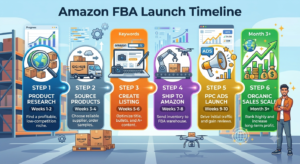
Week 1-2: Product research and validation
Week 3: Source samples and place your first order
Week 4: Set up your seller account and create your listing
Week 5: Receive and ship inventory to Amazon
Week 6: Launch with PPC advertising
Week 7-8: Monitor, optimize, and gather reviews
Month 3+: Evaluate performance and plan next steps
Success in Amazon FBA requires:
- Diligent product research
- Understanding of all costs and margins
- Patience during the ramp-up period
- Willingness to optimize and improve
- Consistent attention to your business
The path to significant income:
Single product businesses can reach $2,000-$10,000 per month. Multiple products under a brand can generate $10,000-$50,000+ per month. The ceiling is much higher for those who build real brands rather than just selling single products.
Start small. Learn continuously. Compound your knowledge with each product launch. The businesses that succeed long-term are the ones that treat Amazon FBA as a real business, not a lottery ticket.
Continue building your business knowledge:
- Explore more side income: 25 Legitimate Side Hustles That Pay $500+ Per Month
- Start your side business: How to Start a Profitable Side Business While Working Full-Time
- Master gig work earnings: Gig Economy Guide: Making Money with Uber, DoorDash, and More
- Learn to freelance: Freelancing for Beginners: How to Land Your First Client
- Manage your finances: How to Create a Personal Budget That Actually Works in 2024